
Support
V1 · EVM + SOLANA · 13 CHAINS

Multi-chain execution terminal
for EVM and Solana

Launch-time buying, pre-trade honeypot simulation, private-mempool routing and automatic take-profit / stop-loss — in one desktop application.

Direct install — no store, no wait. v2.82.0

Non-custodialkey only on your device
0.369%fee per trade
500 CSTfor creating your account
csb — sniper@bnb

      
CAKE ▲ +38%
No Honeypot ✓
TP hit · +50%
0
Supported networks
0
Interface languages
0
Platforms: Windows · macOS · Linux · Android
0
CST on sign-up
// FEATURES

Functions

Execution, protection and monitoring in one application.

Launch sniping

Watches a token and submits the buy when liquidity is added to the pool.

Anti-honeypot / rug

Simulates the sell and inspects the contract before buying. If you can't sell, it blocks.

MEV protection

Routes your orders through a private mempool — anti-sandwich and anti-frontrun.

Auto-sell TP / SL

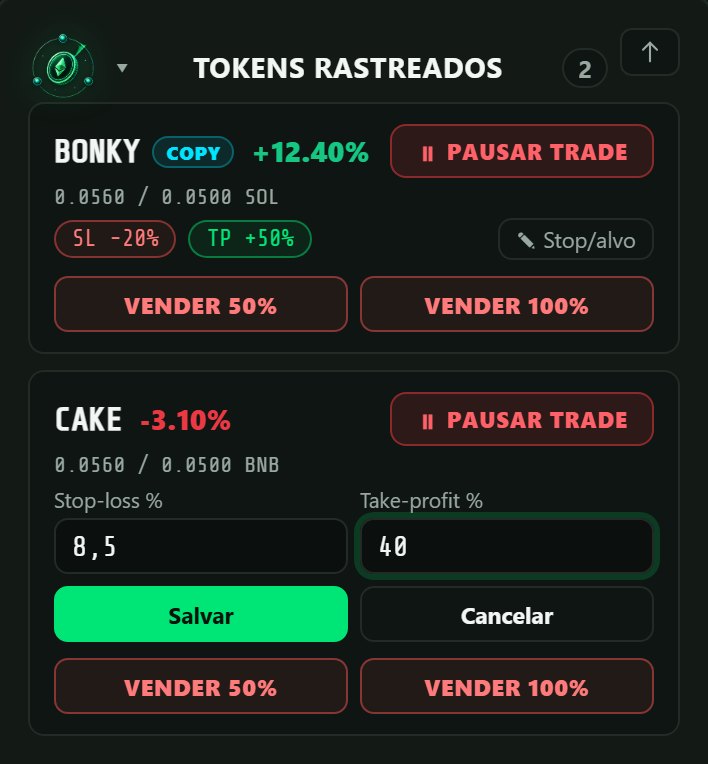
Take-profit, stop-loss, trailing stop and USD price target (full or partial). Each position keeps its own stop and target, editable on the tracked-token card.

Copy Trade

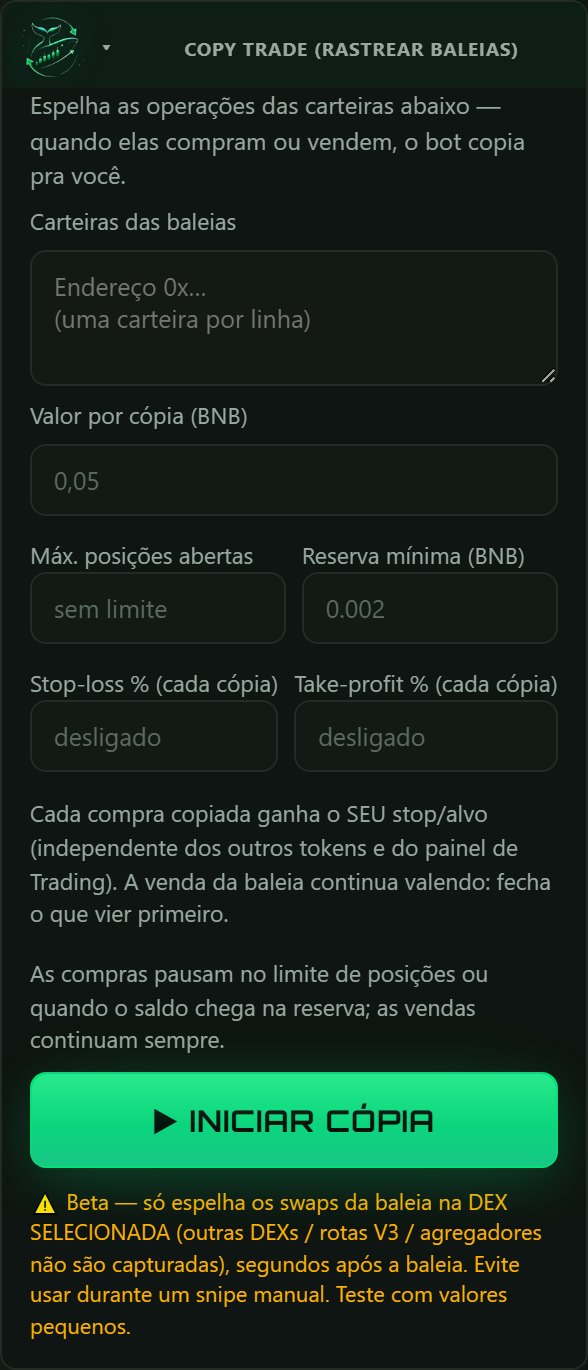
Mirrors the buys and sells of the wallets you select. Each copied buy gets its own stop-loss and take-profit; limits for open positions and a minimum balance reserve.

Multi-chain (13 chains)

EVM + Solana in one app. The whole panel adapts to the chain you pick.

Live P&L console

Price, balance, liquidity and profit/loss in real time. Console messages in the selected language (EN, PT, ES, ZH, HI).

Non-custodial

The private key is encrypted by the operating system (DPAPI on Windows, Android Keystore on Android) and never leaves the device.

pump.fun bonding curve

Buys and sells tokens still on the pump.fun curve. When the standard Jupiter route rejects a token, the order is routed through Jupiter Ultra.

USDT / USDC as base

Trade with the native coin or with USDT/USDC on networks with stablecoin liquidity. With a stable base, cost, value and P&L are in dollars.

Wallet created in the app

Generates a 12-word wallet (EVM and Solana from the same phrase), with a mandatory backup check before first use. Importing an existing key is also supported.

Wallet tokens

Lists every token held in the loaded wallets, with logo and USD value. Clicking a token opens it on the chart.

Positions survive a restart

Tracked positions are saved locally and resumed with the same P&L reference, stop and target after the app is reopened or updated.

Trade history

Every closed position: entry, exit, result in coin and USD, %, exit reason and duration, with on-chain verification status. CSV export.

SOL recovery

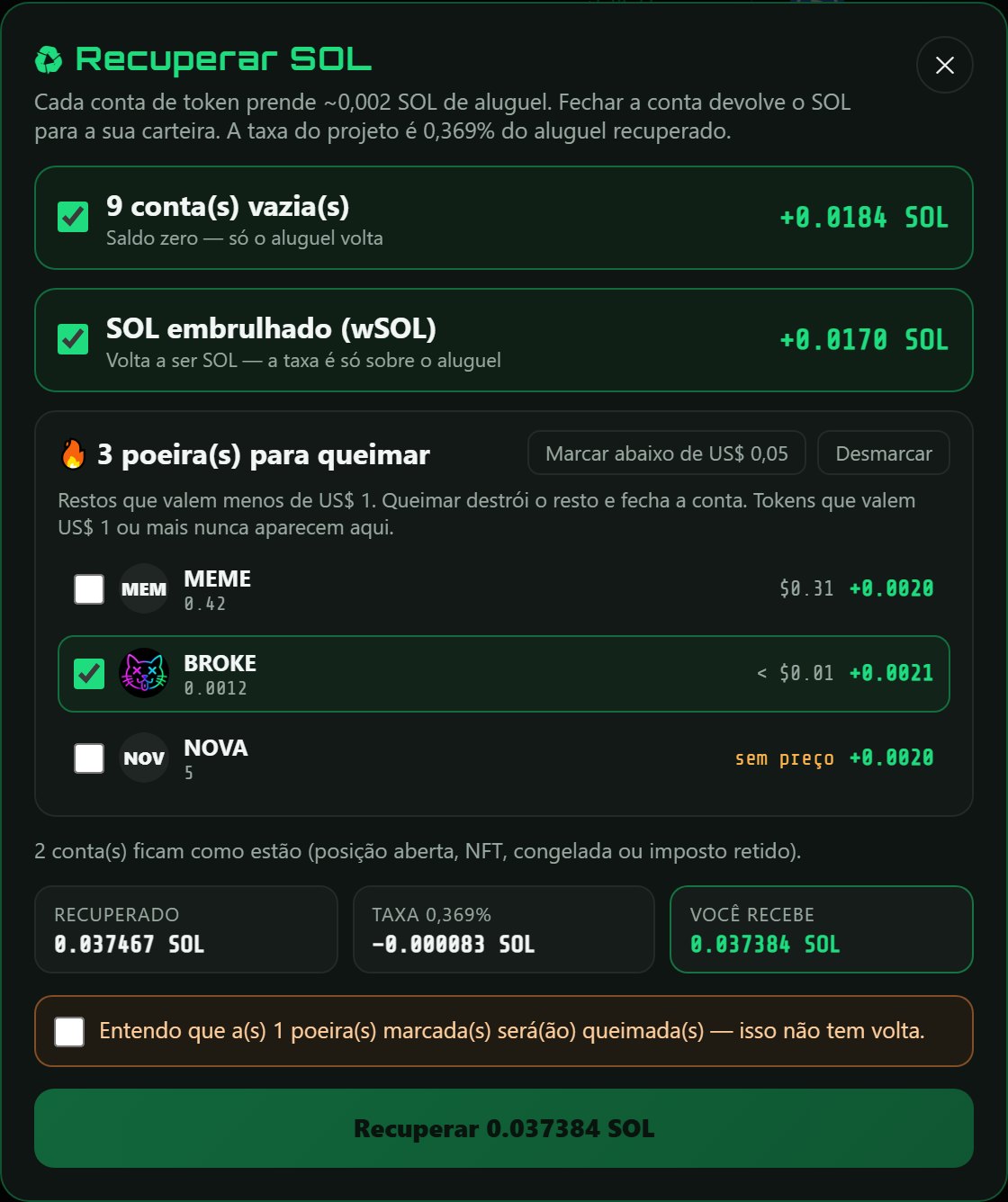
Closes empty Solana token accounts, unwraps leftover wSOL and optionally burns dust under US$1, returning ~0.002 SOL of rent per account.

Partners: $BROKE

Holding $BROKE in the bot's Solana wallet lowers the fee on Solana trades: US$100 → 0.30%, US$500 → 0.22%, US$2,000 → 0.15%, US$7,500 → 0.09%.

// TRADING RANK

Rank verified on the blockchain

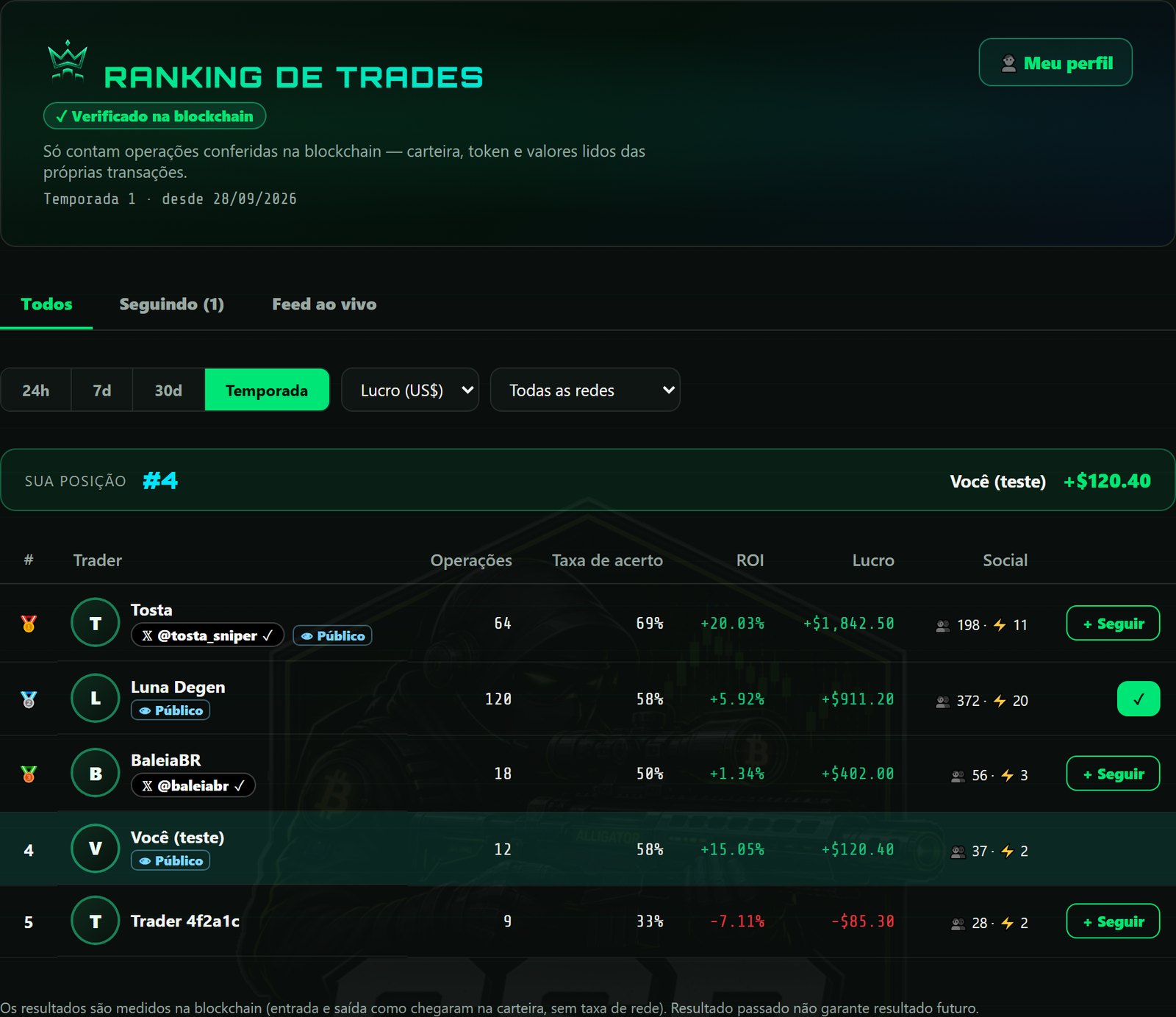
Only trades confirmed on-chain are counted. Cost and value are read from the transactions themselves — a result typed into the app is not accepted.
Trading Rank
Rank by profit (US$), ROI, win rate or total P&L — per period and per network. Tabs: All, Following and Live feed.

How a trade is verified

01

Wallet link

The app signs a fixed message on the device. The server checks the signature; the private key never leaves the device.

02

Trade

The bot records the transaction hashes of every buy and sell of the position.

03

On-chain reading

The server reads each transaction: signer, token received or sent, coin spent or received, through a known DEX router.

04

Result

Cost, value and P&L come from those amounts. Each buy and each sell counts once.
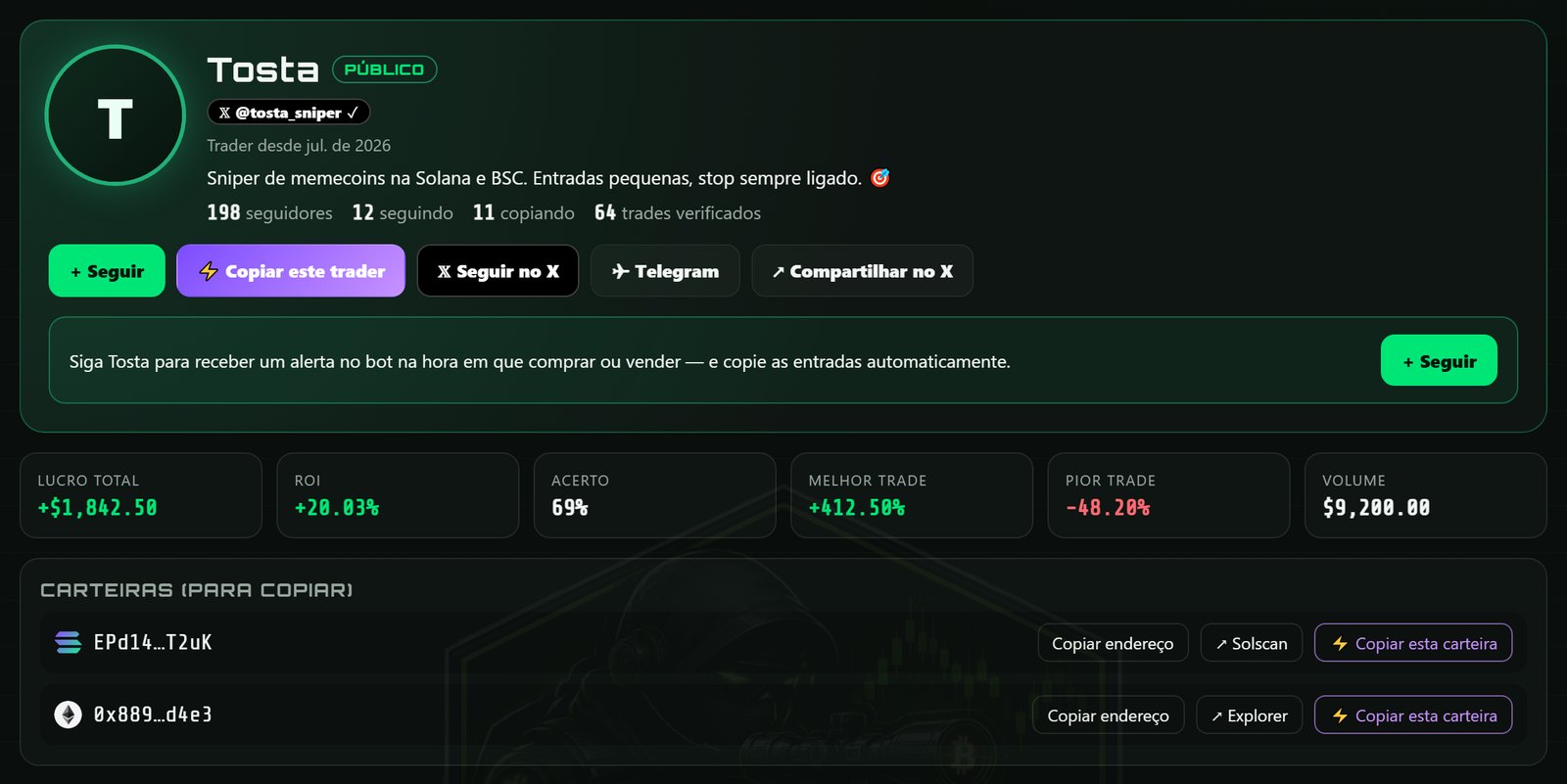
Trader profile
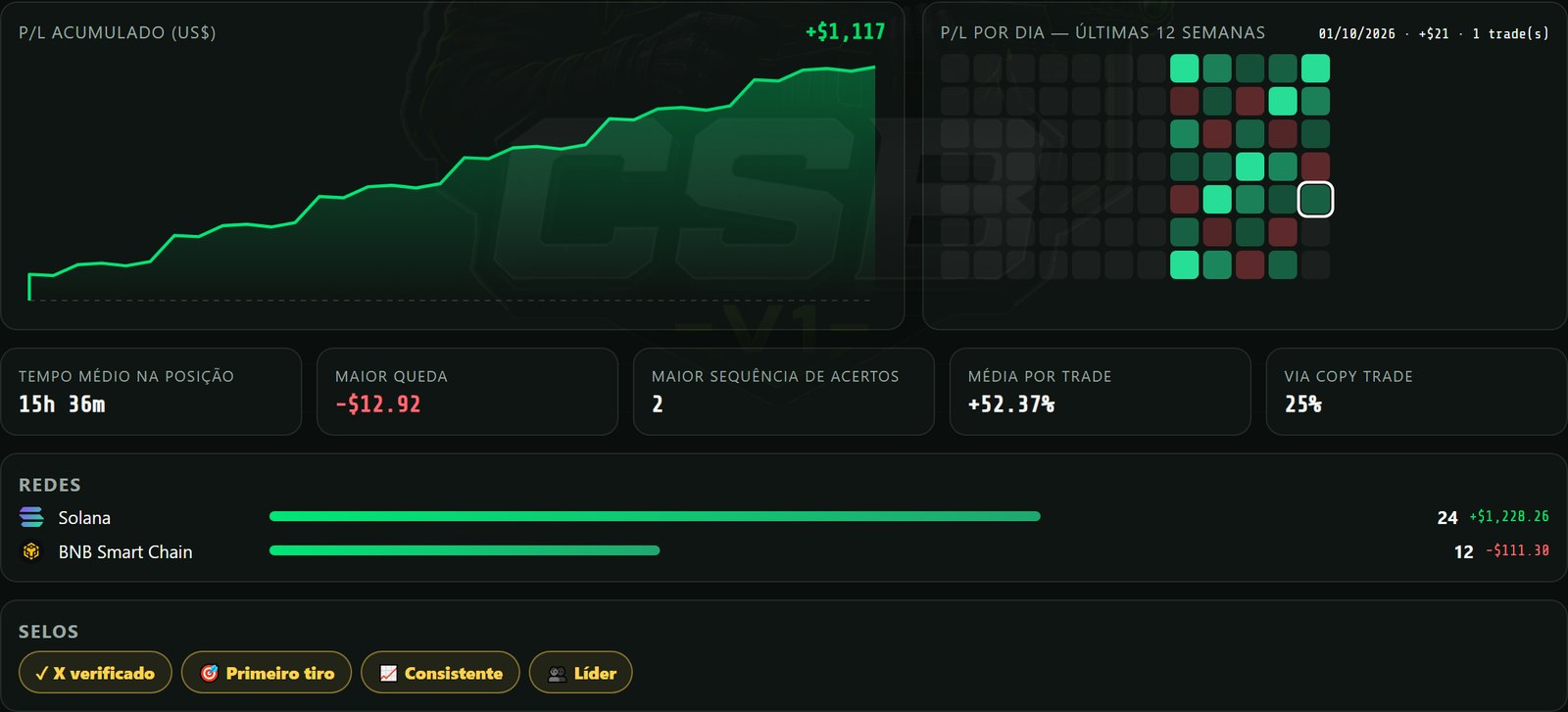
Trader profile: followers, following, copiers, verified trades, wallets to copy
Trader statistics
Cumulative P&L curve, daily calendar, holding time, drawdown, networks and badges
Follow + live alerts

When a followed trader with a public profile buys or sells, an alert appears in the bot with "View profile" and "Copy".

Copy in one click

Opens Copy Trade on the right network with the trader's wallet already listed. Amount, stop and target are reviewed before it is switched on.

Public profile is opt-in

Off: only verified totals appear in the rank. On: trades, activity and the wallets chosen for copying are shown.

Verified X account

The owner posts a one-time code from the X account; the server reads the post and confirms the author. Share profile and results on X.
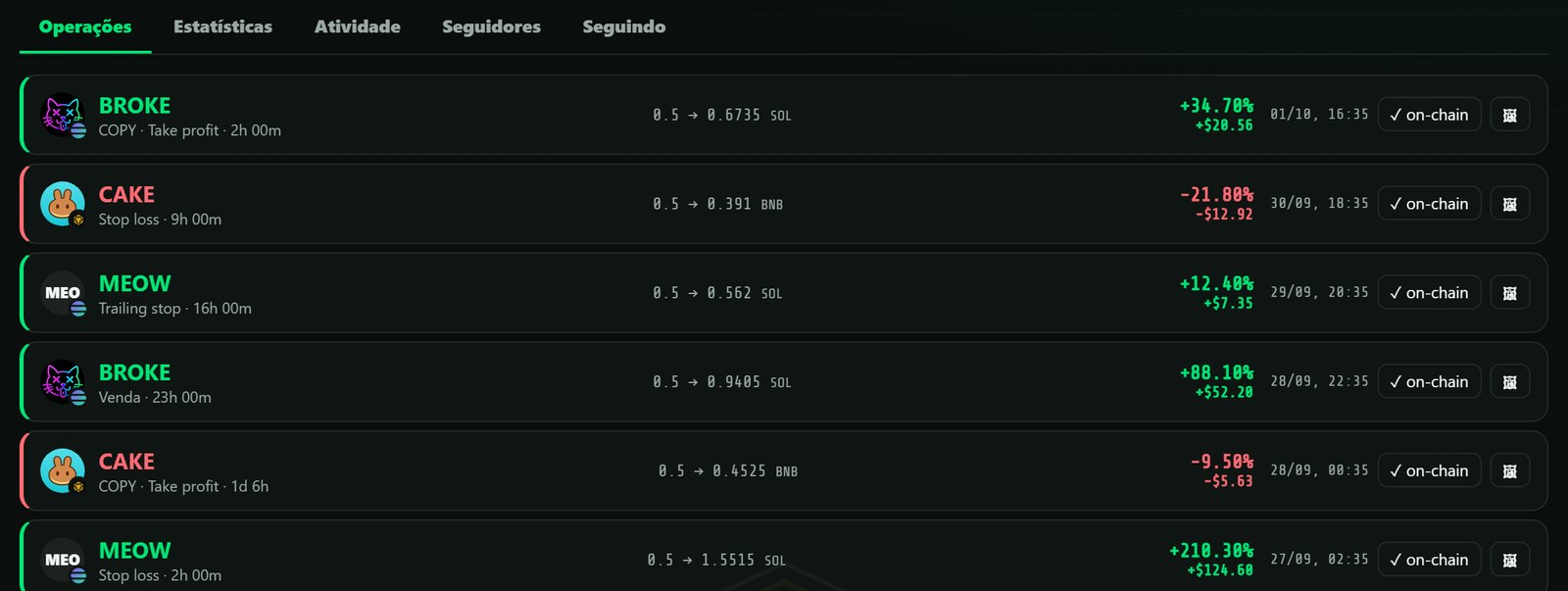
Verified trades
Trades tab: each result with a link to the transaction on the explorer

The rank measures what the wallet actually spent and received, excluding network fees. Past results do not indicate future results.

// TOOLS

History, results and wallet maintenance

What happens after the order: the record of every trade, the result image, per-position control and the rent left in Solana accounts.
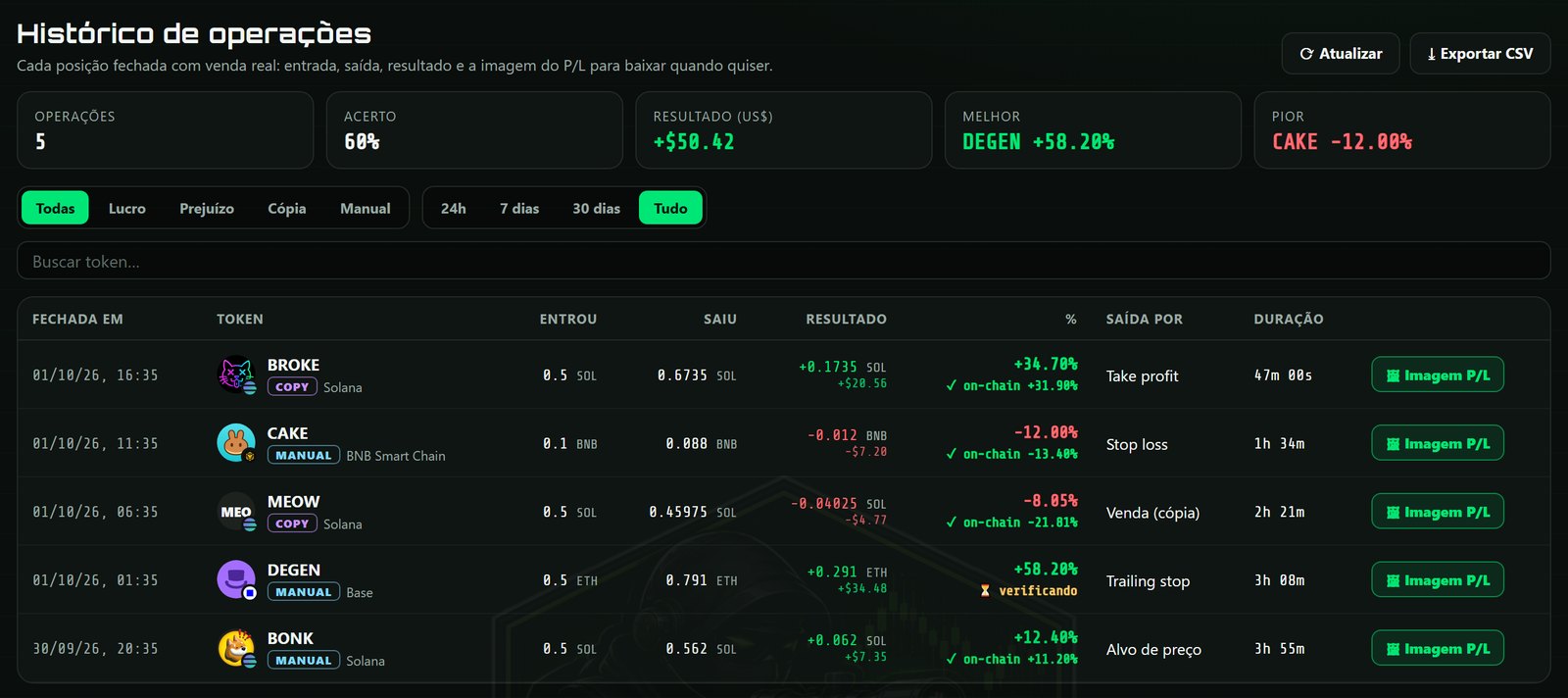
Trade history

Trade history

  • Entry, exit, result in coin and USD, %, exit reason (take profit, stop loss, trailing, price target, sale) and duration.
  • On-chain mark per trade: ✓ on-chain with the verified %, or verifying while the network confirms.
  • Filters by result, origin (copy/manual) and period; search by token; CSV export.
  • The P/L image of any trade can be generated again at any time.
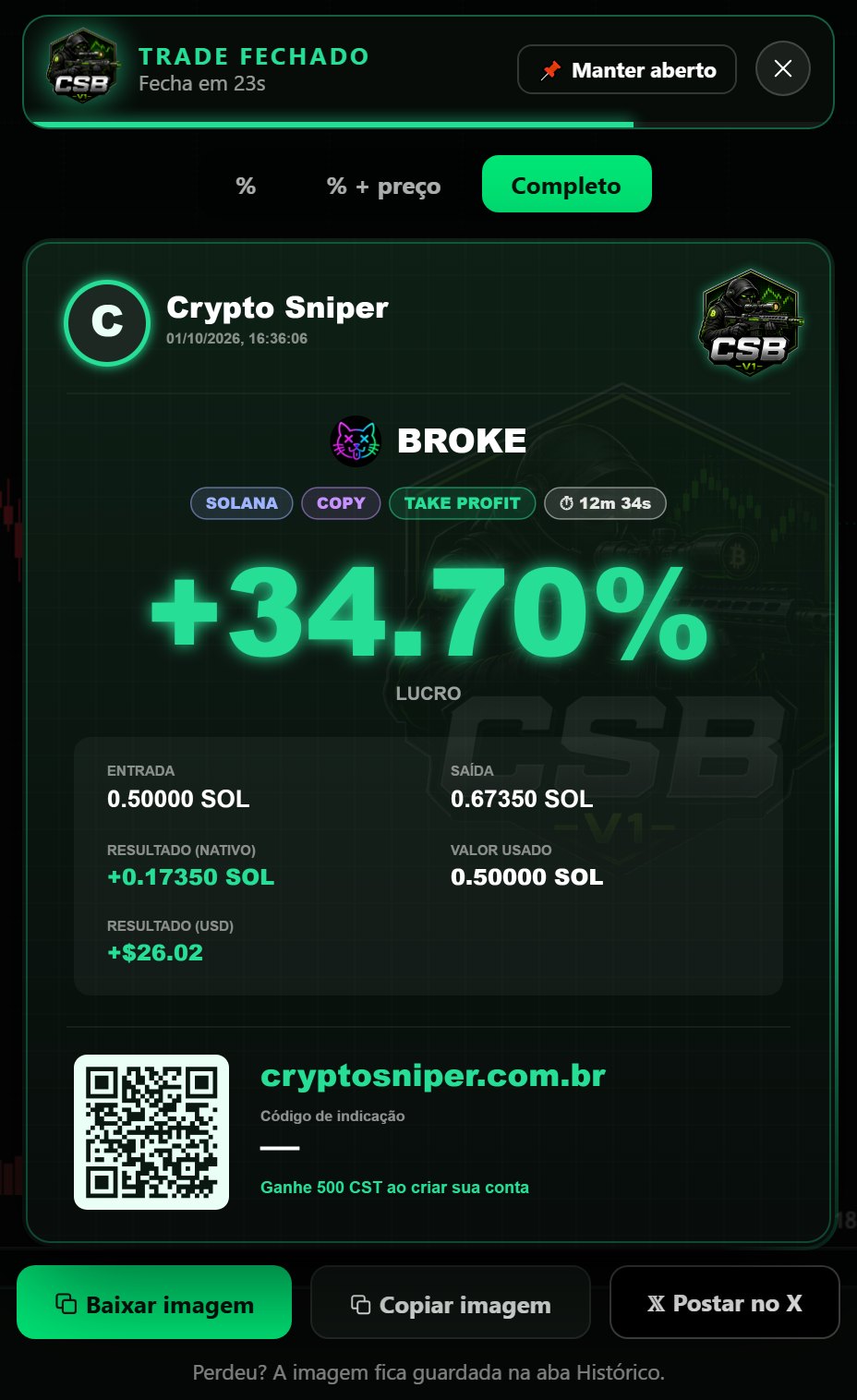
Trade result card

Result card on close

  • Opening animation with the bot mark and the trader's photo, then the image: token logo, network, COPY/MANUAL, exit reason and duration.
  • Stays on screen for 30 seconds and closes by itself; hovering pauses, any click keeps it open.
  • Three detail levels (%, % + price, full), download, copy and post on X with the referral link.
Per-position stop and target
Copy trade with stop and target

Stop and target per position

  • Each tracked token has its own stop-loss and take-profit, edited on its card. Price target and trailing stop of the position are kept.
  • Copy Trade: stop-loss % and take-profit % applied to every copied buy, independently of the other tokens and of the Trading panel.
  • The whale's sell still applies — whichever happens first closes the position.
SOL recovery

SOL recovery

  • Every Solana token account holds ~0.002 SOL of rent. Closing empty accounts returns it to the wallet.
  • Leftover wSOL is unwrapped. Dust worth under US$1 can be burned and closed — only what is selected, with a confirmation step.
  • Never touched: tokens with an open position, NFTs, frozen accounts, withheld transfer fees, tokens worth US$1 or more.
  • The green button appears in the wallet from 0.01 SOL. Fee: 0.369% of the rent recovered, in the same transaction.
// THE TERMINAL

Live chart + execution, side by side

Real-time GeckoTerminal, contract data and your order — on the same screen.

Crypto Sniper Bot · BNB Smart Chain · 13 networks
Crypto Sniper Bot terminal — live chart, contract data and anti-honeypot
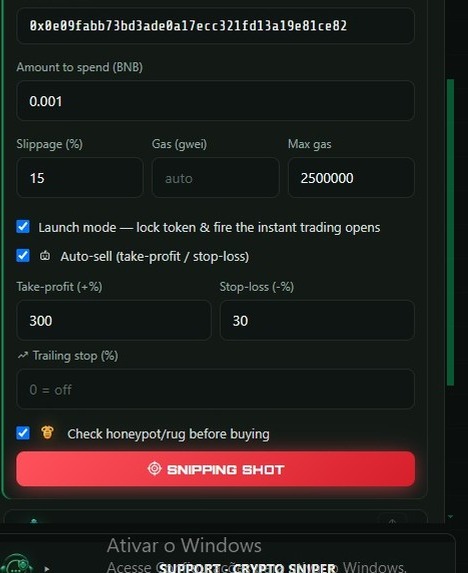
Snipe & Auto-sell

Launch mode, take-profit, stop-loss and trailing stop in one panel.
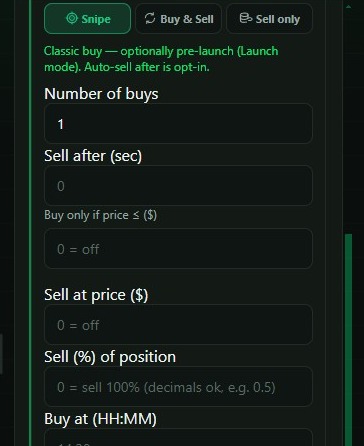
Advanced sniping

Multi-buy, price triggers, scheduling and loop mode.
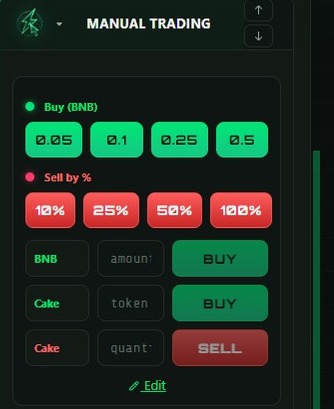
Manual trade

One-tap buy/sell by amount or by % of your position.
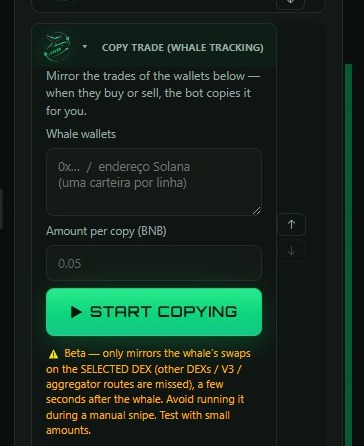
Copy trade

Mirror whale wallets — buy and sell when they do.
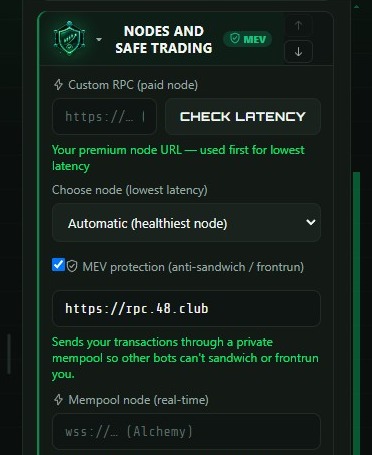
MEV & anti-honeypot

Private mempool, anti-sandwich and safe-RPC routing.
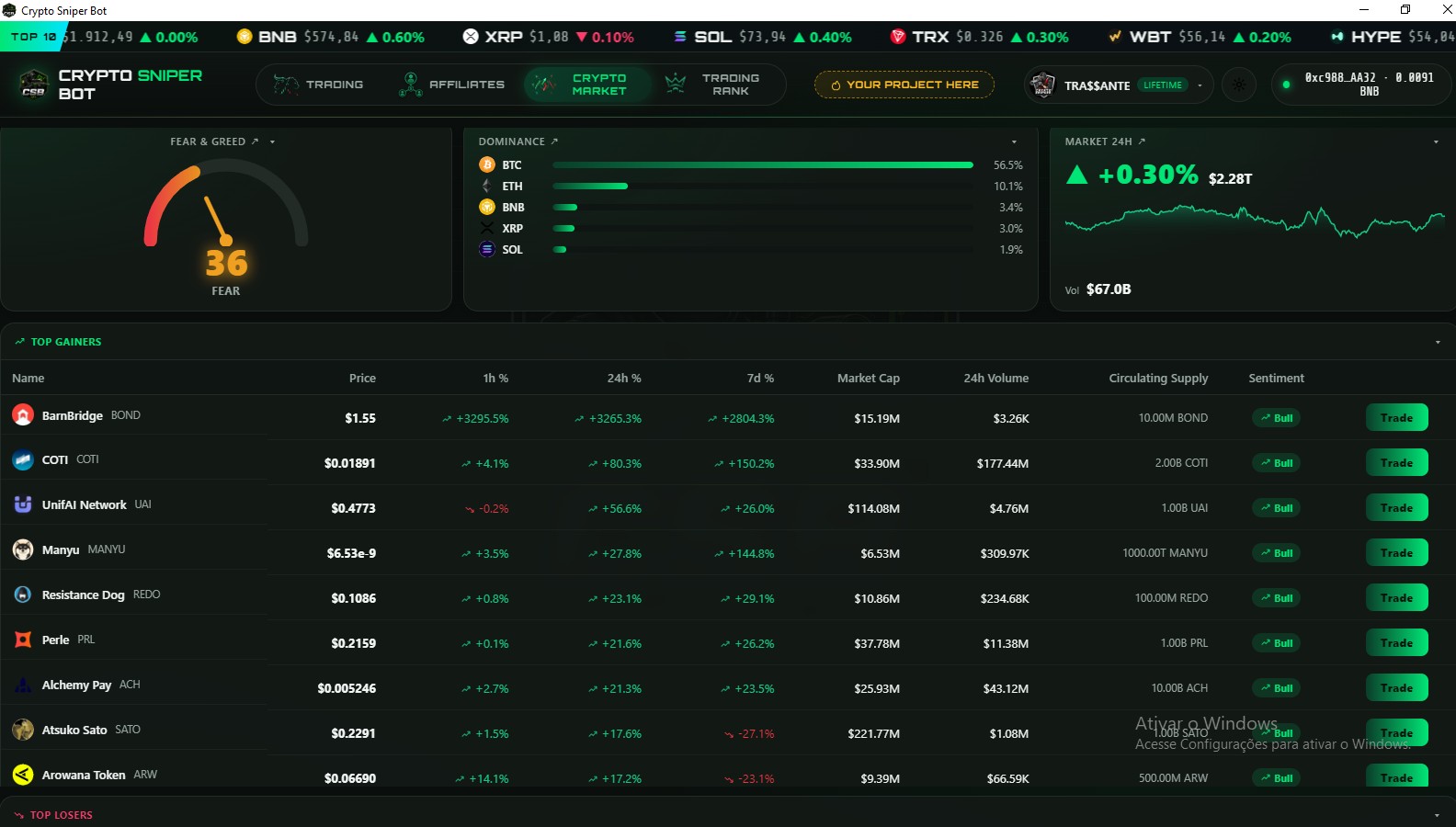
Market radar — Fear & Greed, dominance and top movers
// MULTICHART

Integrated chart terminals

Nine chart terminals selectable from the trading screen, without closing the open position.

GeckoTerminal DexScreener DexTools Birdeye PooCoin DexView DexGuru GMGN Photon
Multichart terminal selector inside Crypto Sniper Bot
Switching the chart engine does not affect an armed order.

All terminals and trademarks belong to their respective owners.

// ARBITRAGE

The same coin, two prices

A live scanner across 13 major exchanges. It finds the gap, subtracts every fee, and hands you the trade step by step — screen by screen, below.
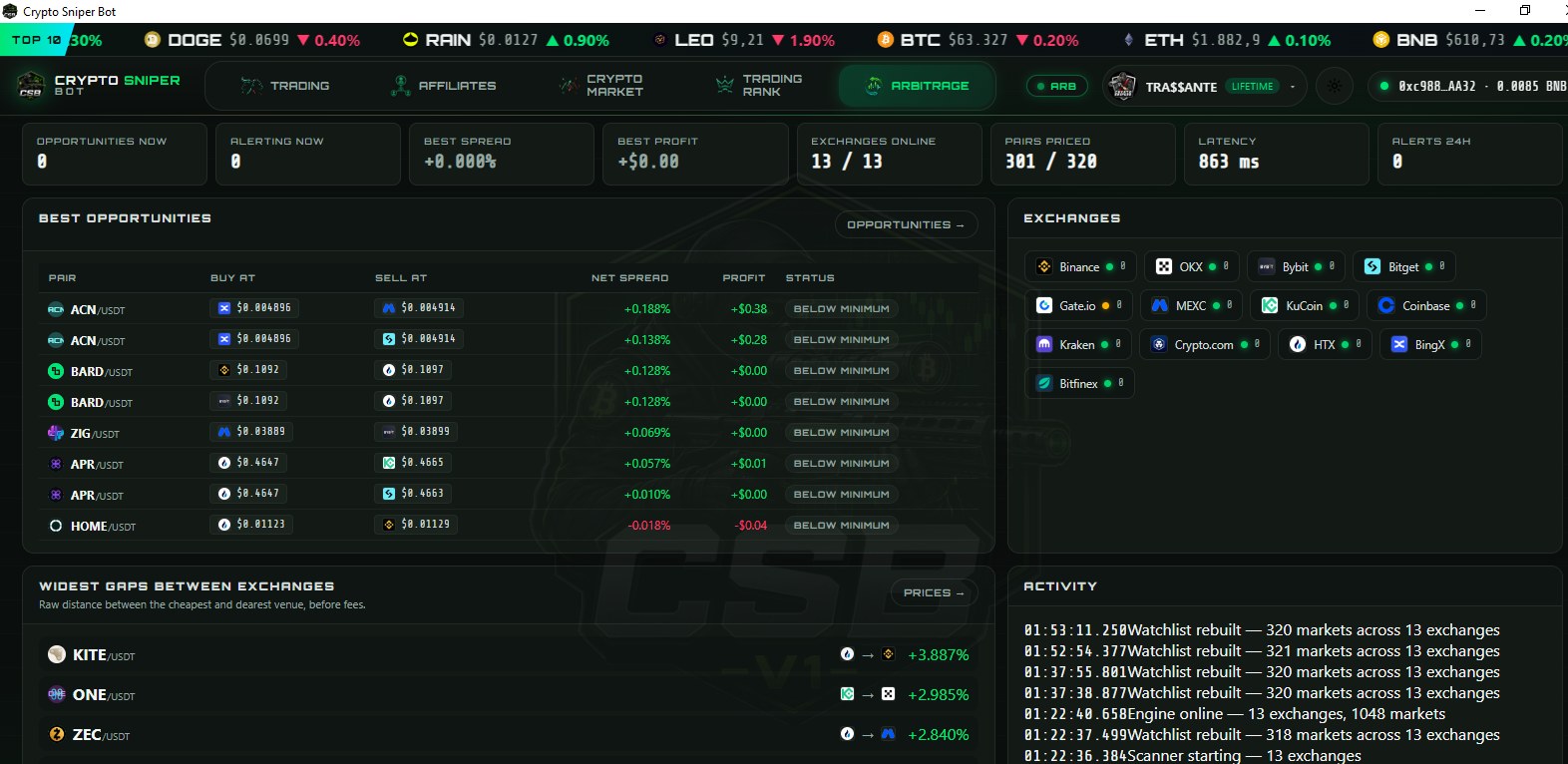
13exchanges watched live
320markets priced every scan
24/7background scanning
0spreads shown net of fees
01

Overview — the whole board at a glance

Arbitrage overview
  • Top row of counters — opportunities open right now, how many are alerting, the best spread and best profit of the moment, exchanges online (13/13), markets priced (301 of 320), engine latency and alerts in the last 24h.
  • Best opportunities — the strongest routes right now: pair, where to buy, where to sell, net spread and profit in dollars, each with its status.
  • Widest gaps between exchanges — the raw distance between the cheapest and the dearest venue, before fees. This is where to hunt, not where to trade blind.
  • Exchanges panel and Activity log — every venue with its live status dot, plus a timestamped log: scanner starting, engine online, watchlist rebuilt, markets counted.
02

Opportunities — the trade, written out for you

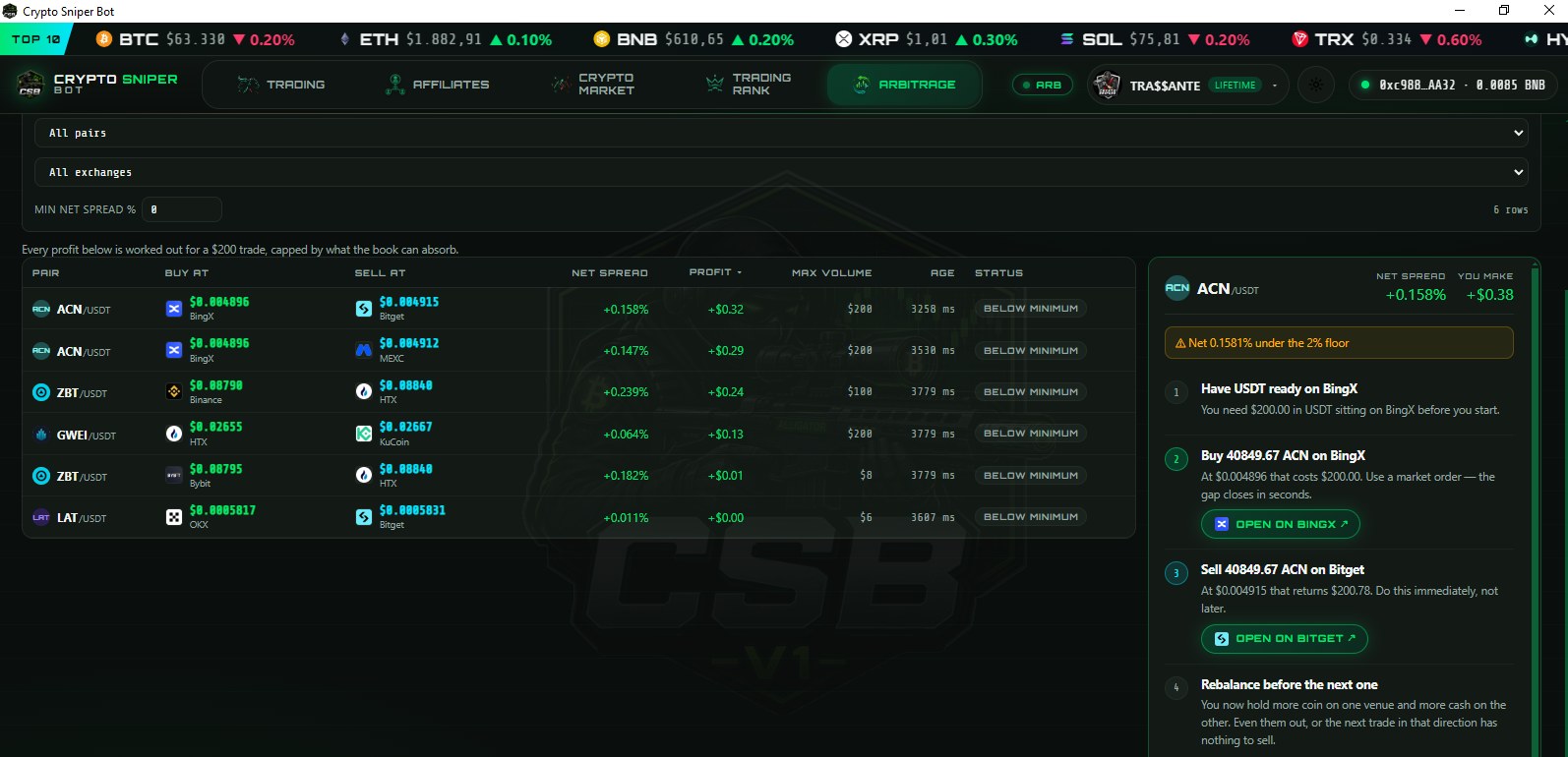
Arbitrage opportunities and step-by-step plan
  • Filters — narrow by pair, by exchange, or by a minimum net spread, so only what matters to you stays on screen.
  • The table — pair, buy venue and price, sell venue and price, net spread (fees already out), profit in dollars, max volume the book can absorb, the quote's age in milliseconds, and the status.
  • Step-by-step panel — pick a row and the trade is spelled out: ① have USDT ready on the buy venue, ② buy an exact amount at an exact price, ③ sell it immediately on the other venue, ④ rebalance before the next one.
  • Open on … buttons — jump straight to the right page on each exchange, no searching.
  • Warnings
03

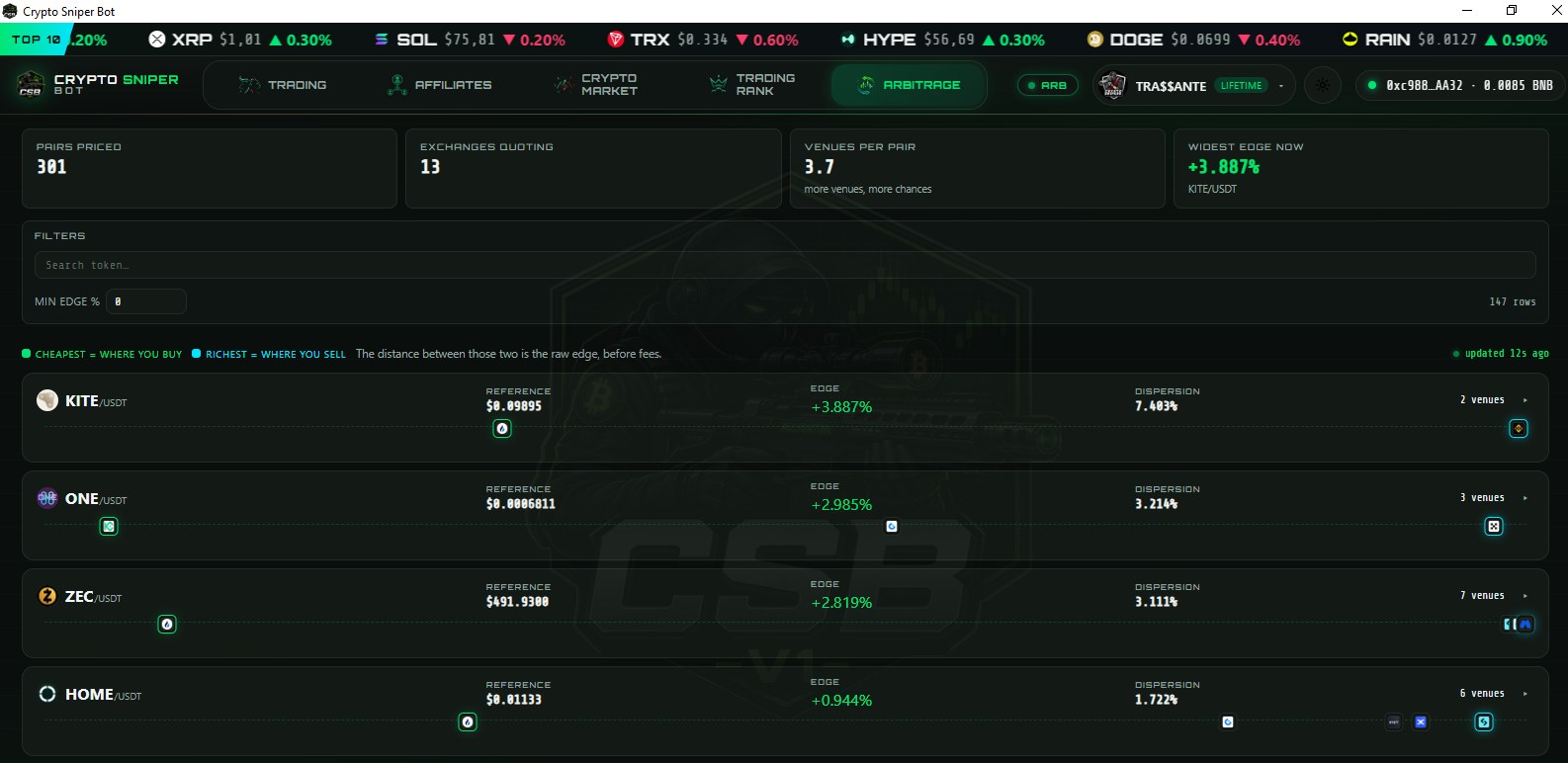
Prices — one token, every venue

Live prices across exchanges
  • Header — markets priced, exchanges quoting, average venues per pair (more venues, more chances) and the widest edge on the board right now.
  • Colour code — green marks the cheapest venue (where you buy), blue the richest (where you sell). The distance between them is the raw edge, before fees.
  • Per token — reference price, edge percentage, dispersion (how disagreed the market is) and how many venues quote it.
  • Search and min edge — type a token or set a floor to cut the list down; the board says how many rows matched and when it last updated.
04

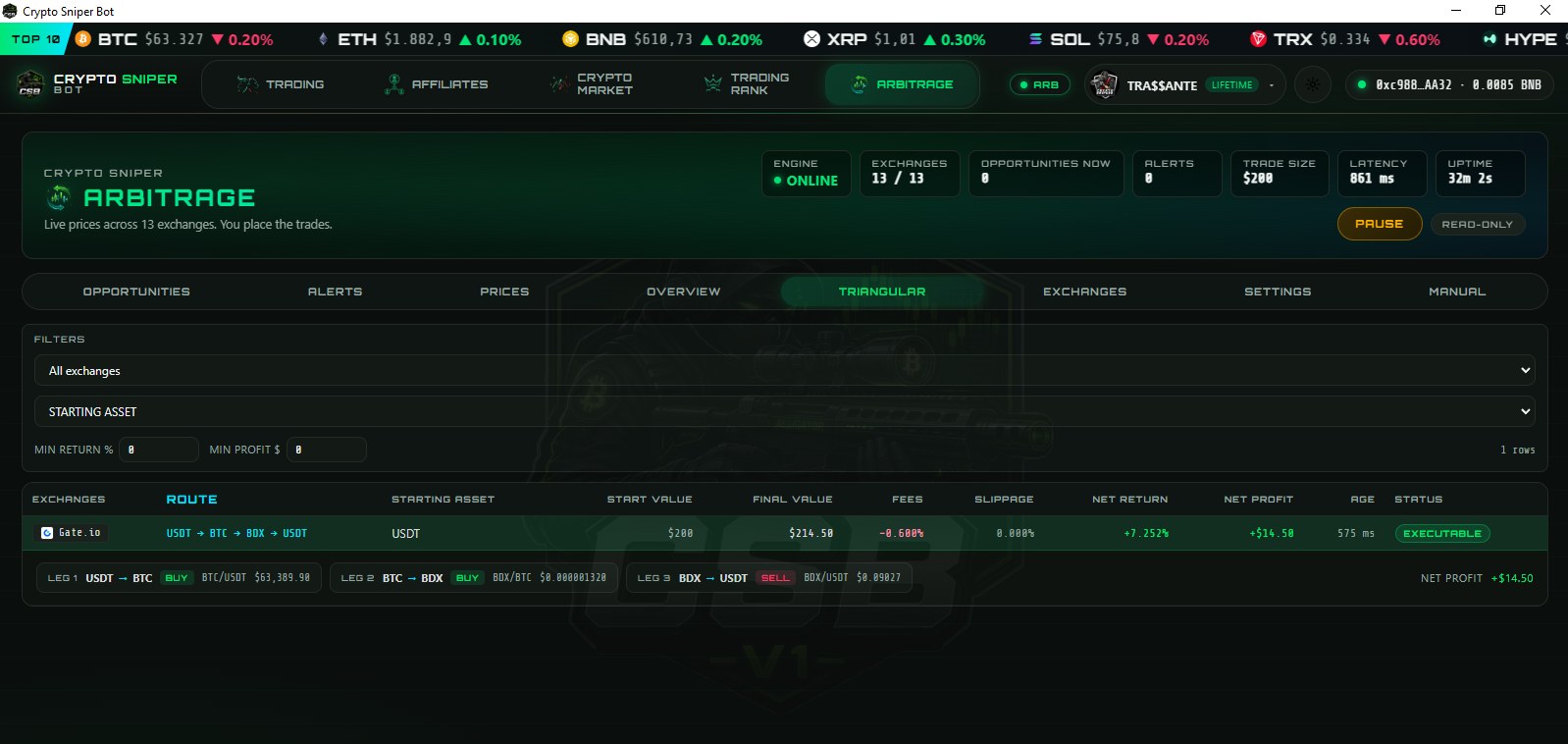
Triangular — three legs on one exchange

Triangular arbitrage route
  • The route — three coins in sequence on a single venue, back to where you started: USDT → BTC → BDX → USDT. No transfers, no withdrawal fee, no network wait.
  • The full maths — start value, final value, fees, slippage, net return and net profit in dollars, plus the age of the quote.
  • Every leg spelled out — leg 1, leg 2 and leg 3, each showing buy or sell, the exact market and the exact price to work at.
  • Status — EXECUTABLE means it clears your thresholds and the book supports it. Filters let you demand a minimum return or a minimum profit before a route is even listed.
05

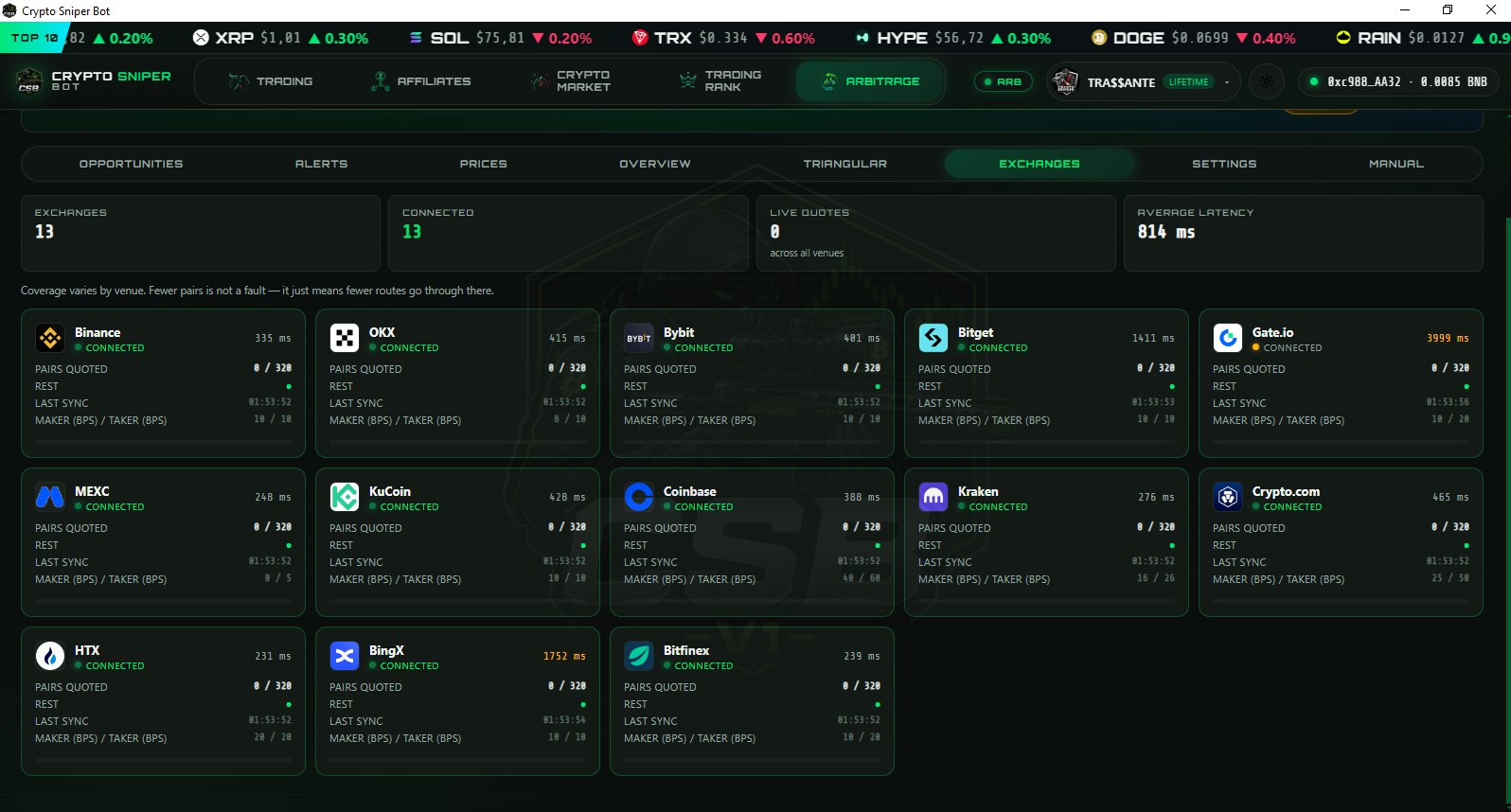
Exchanges — 13 venues, one health panel

13 connected exchanges
  • Who is connected — Binance, OKX, Bybit, Bitget, Gate.io, MEXC, KuCoin, Coinbase, Kraken, Crypto.com, HTX, BingX and Bitfinex, each with a live status.
  • Latency per venue — the delay to each exchange in milliseconds, plus the average across all of them. A slow venue is a stale price.
  • Coverage and sync — pairs quoted out of the full watchlist, REST health dot and the exact time of the last sync.
  • Maker / taker in basis points — the fees used in every calculation. Put your real tier in and the whole board re-prices around it.
06

Alerts — notification when a spread crosses your threshold

Arbitrage alerts
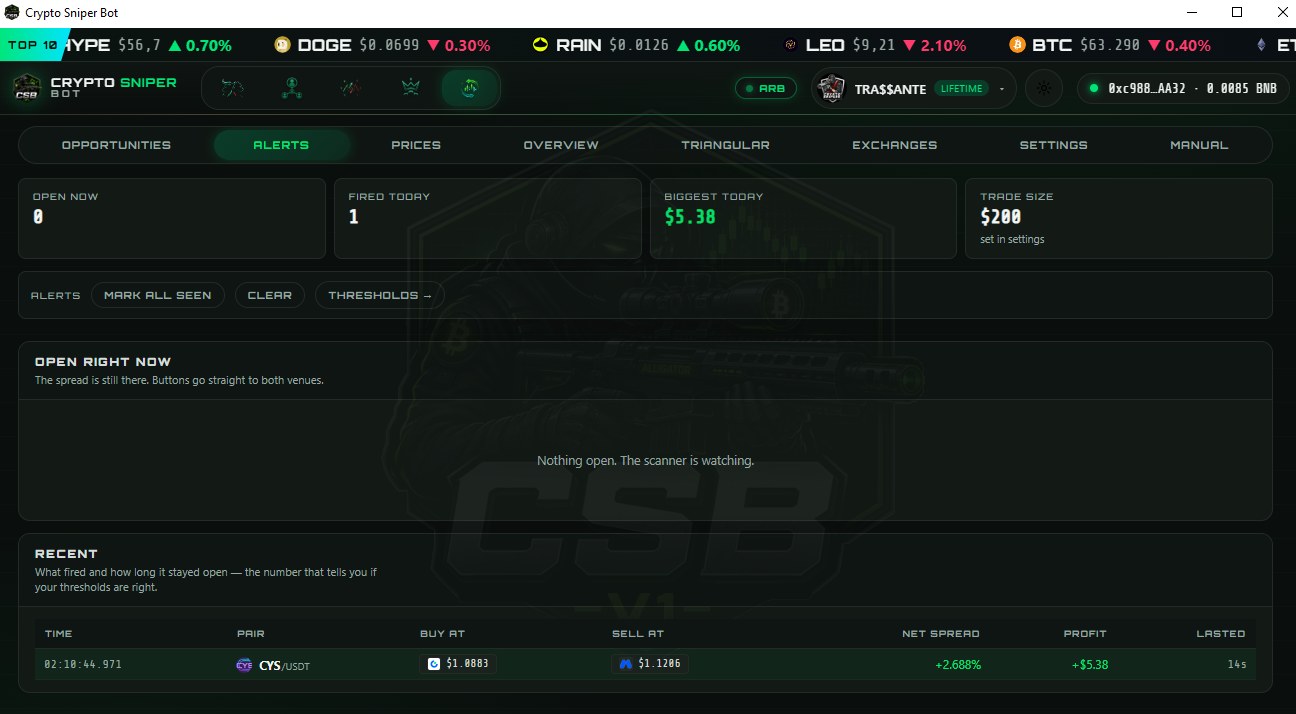
  • Counters — how many are open now, how many fired today, the biggest of the day and the trade size everything is measured against.
  • Open right now — the spread is still there; the buttons take you straight to both venues.
  • Recent — what fired and how long it stayed open. That number is what tells you whether your thresholds are right.
  • Controls — mark all as seen, clear the list, or jump to thresholds to tune what deserves to interrupt you.
07

Settings — every guardrail is yours to set

Arbitrage settings
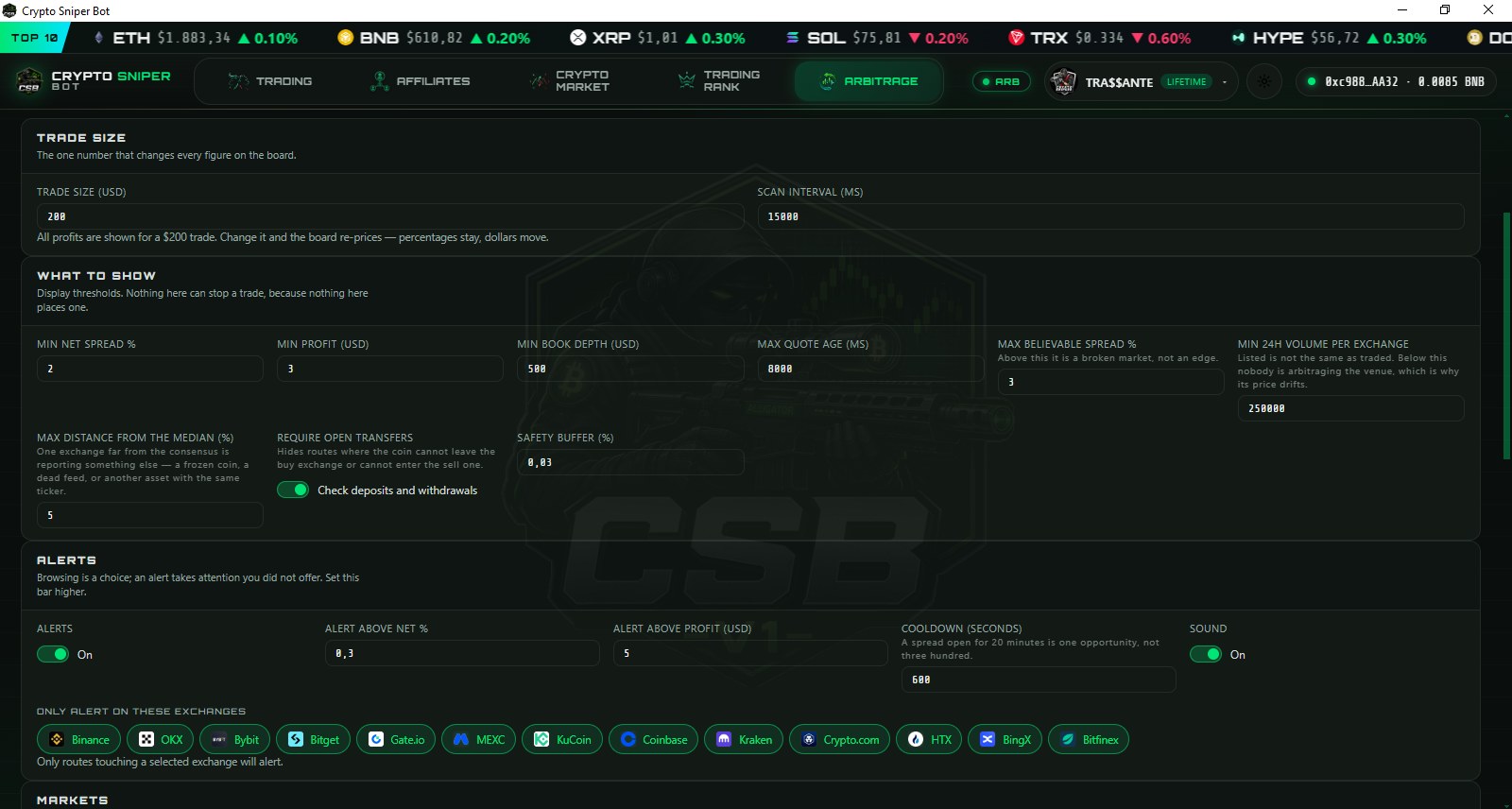
  • Trade size and scan interval — the one number that re-prices the whole board: percentages stay, dollars move.
  • What to show — minimum net spread, minimum profit, minimum book depth, maximum quote age. Display thresholds only: nothing here places a trade.
  • Reality filters — max believable spread (above it, the market is broken, not an edge), minimum 24h volume per venue, max distance from the median (one exchange far from consensus is a frozen coin or a dead feed) and a safety buffer.
  • Require open transfers — hides routes where the coin cannot leave the buy exchange or cannot enter the sell one. It checks deposits and withdrawals for you.
  • Alerts — fire above a net percentage or above a dollar profit, with a cooldown so one spread open for 20 minutes is one alert, not three hundred — plus sound, and a per-exchange filter.

Fees come out first. The percentage you see is what actually reaches you — buy and sell fees on both venues are already deducted. When a gap doesn't cover its costs, the bot flags it below minimum instead of letting you trade at a loss.

// MARKET INTELLIGENCE

Market map: top 1,000 assets

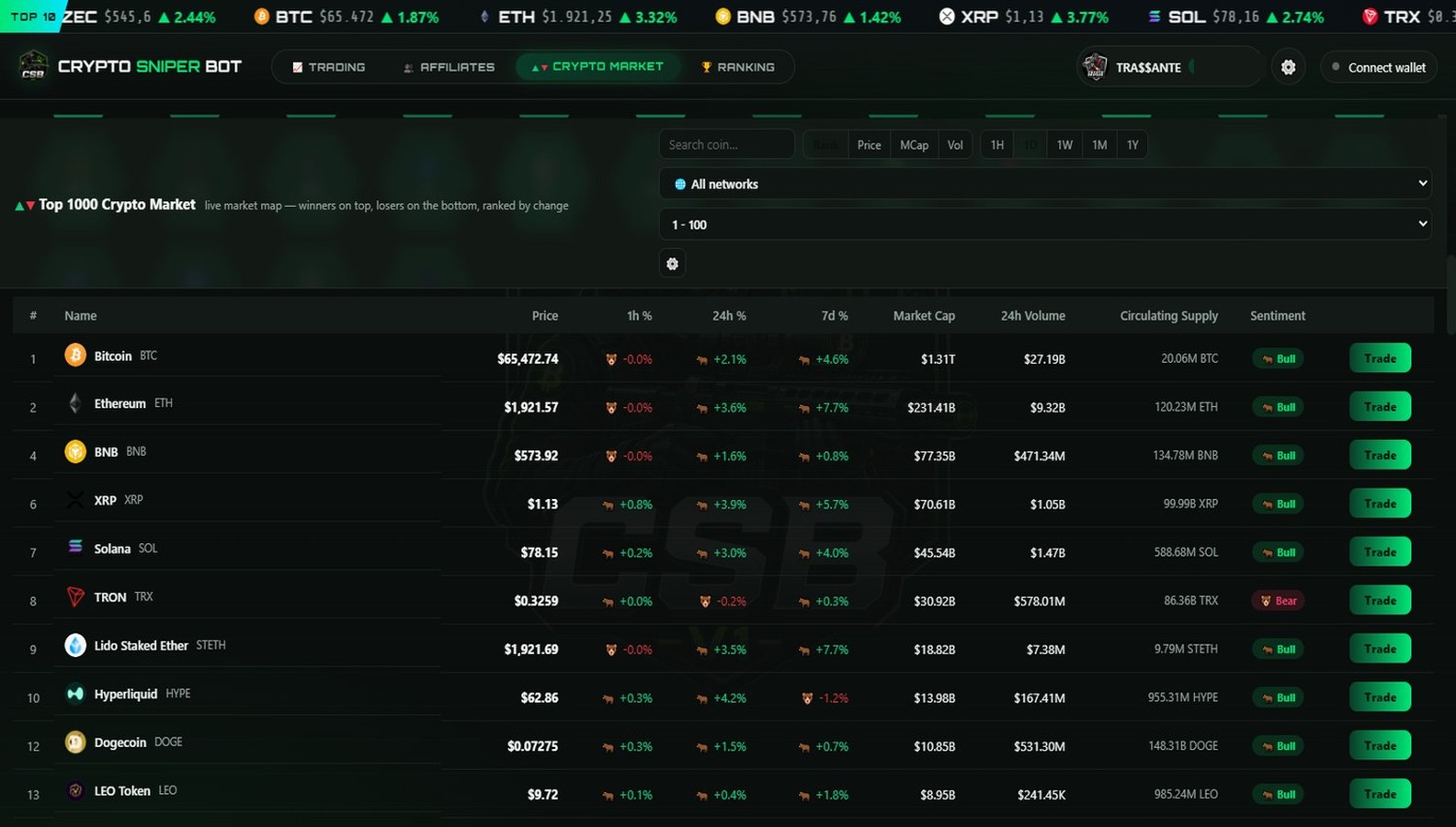
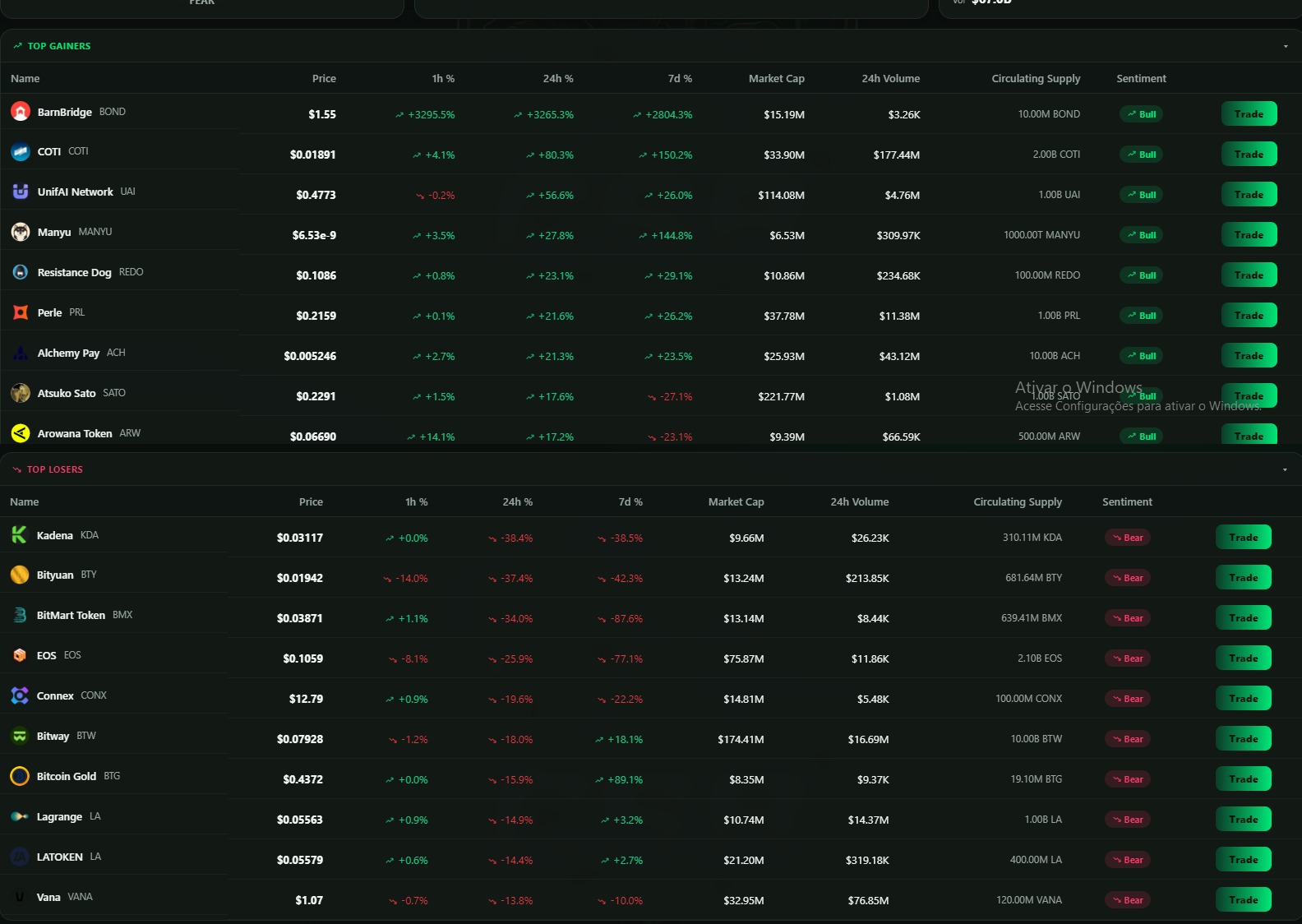
Heatmap of the top 1,000 assets by market capitalisation, coloured by price change, with a trade shortcut on every tile.
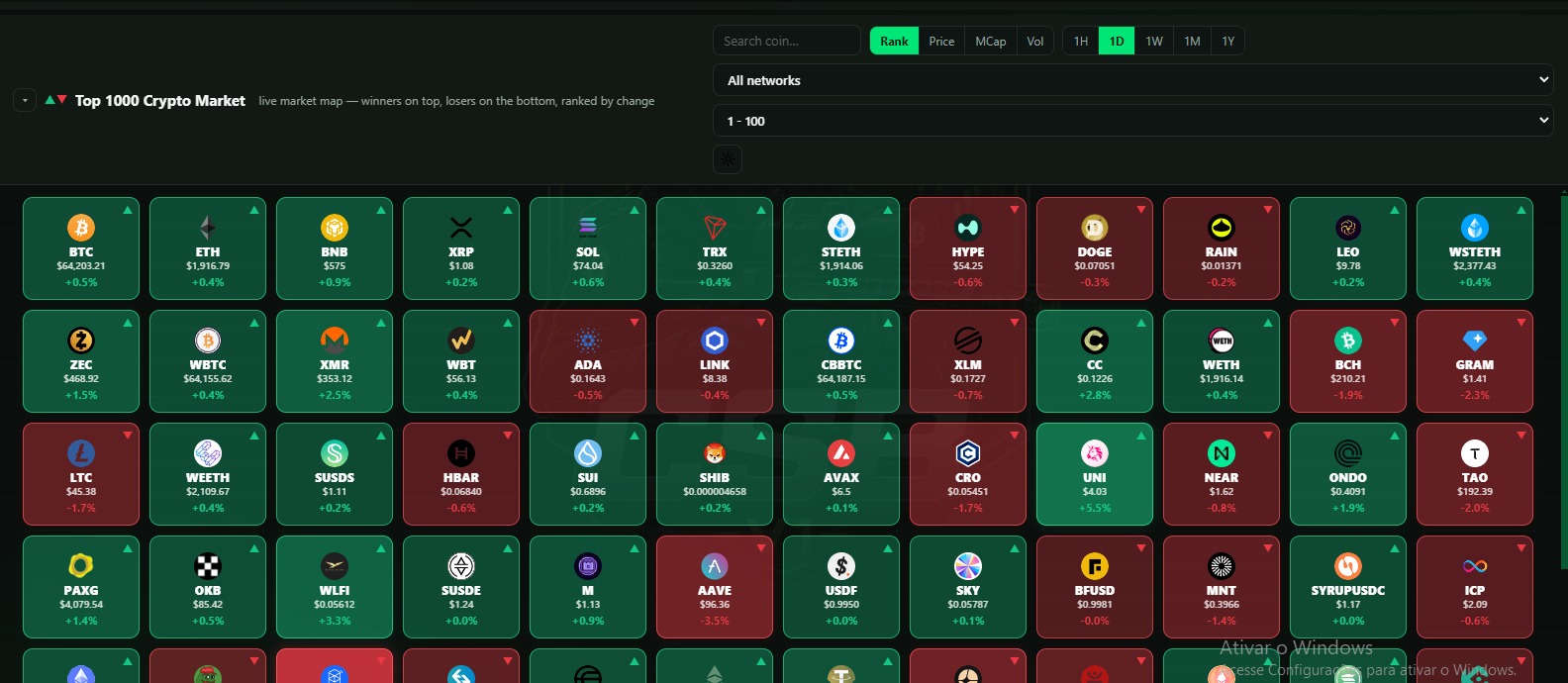
Top 1000 crypto market heatmap
Live heatmap — 1000 assets ranked by change, filtered by network, period and volume
Top 10 gainers and losers
Top gainers & losers — the biggest movers, ranked side by side
Top 1000 table with sentiment
Analyst table — price, volume, supply and Bull/Bear sentiment, with a Trade button on every row
// DEMO

See the bot in action

Recorded walkthrough: contract input, protections, execution and exit.

▶ Watch the demo
// HOW IT WORKS

Workflow in 4 steps

01

Connect

Import a dedicated wallet. The key is encrypted locally — non-custodial.

02

Configure

Paste the contract, set amount, slippage and gas, and turn on the protections (honeypot/MEV).

03

Execute

Buy manually or arm the automatic mode: snipe + take-profit / stop-loss.

04

Exit

Monitor P&L; the bot sells when the configured target or stop is reached.

// SECURITY

Key custody

Non-custodial on every platform: the trading engine runs on the device itself and the private key is encrypted locally. No server holds or receives the key.

  • Local encryption — DPAPI on Windows, Android Keystore on Android. The key never appears on screen or in logs.
  • Android — app PIN, screenshots blocked on key screens, external links opened only over https. Automations run while the app is open.
  • Rank without the key — wallet ownership is proven by a signature made on the device; only the signature is sent.
  • Dedicated wallet — we recommend a wallet exclusive to the bot, with a balance limited to what you trade.
  • Anti-honeypot — every buy is preceded by a sell simulation and a contract check.
  • MEV protection — orders routed through a private mempool against sandwich and frontrun.
NON-CUSTODIAL · ON-DEVICE
// COMPARISON

Feature comparison

Widely used trading bots, compared on publicly available information.

Feature Crypto Sniper MaestroBanana GunUnibotPhotonBullX
Fee per trade0.369%1%0.5%1%~1%~1%
PlatformNative desktop + mobile appTelegram botTelegram botTelegram botWeb appWeb app
Networks in one app13 · EVM + Solana~5~4~3~2~5
Chart terminals built in9———11
Key never leaves the device (desktop and Android)✓✗✗✗✗✗
Anti-honeypot with sell simulation✓✓✓——✓
Works without Telegram✓✗✗✗✓✗
Token allocation for referrals✓ $CST—————

Based on publicly available information (Jan 2026). Features and fees may change. All names and trademarks belong to their respective owners.

// REFERRALS

Earn $CST for bringing people who actually trade

One level, and no commissions: what you get is an allocation of the project's own token.

ON SIGN-UP

500 CST

Credited once, the moment you create your account. Nothing to buy and nothing to unlock. Programme limited to the first 12,000 accounts.

PER REFERRAL

+500 CST

Released when that person has traded $500 in volume. Until then it sits in a separate pending balance, visible in the app.

DEPTH

One level only

You earn on the people you invite. Nothing is earned on the people they invite — there is no second level and no commission on anyone's payment.

$CST is the project's utility token on BNB Chain. The screen shows an amount of CST, not a cash value: the token has not launched, and nothing here promises a price, a yield or a return.

// FAQ

Frequently asked questions

Which blockchains are supported?
Thirteen networks: Ethereum, BNB Chain, Polygon, Arbitrum, Base, Avalanche, Fantom, Cronos, Linea, zkSync Era, Monad, Robinhood and Solana — EVM + Solana in a single app.
Is it safe? Do you hold my funds?
No. On every platform the engine runs on your own device and the private key is encrypted locally (DPAPI on Windows, Android Keystore on Android) — it is never sent to a server. On Android, automations (take-profit, stop-loss, copy trade) run while the app is open; for 24/7 operation use the desktop version. Use a dedicated wallet holding only what you trade. We are not responsible for any funds lost while using the tool.
How does it protect me from scams?
Before every buy it simulates a sell and inspects the contract to detect honeypots and rugs. MEV protection routes your orders through a private mempool to avoid sandwich and frontrun attacks.
Which operating systems does it run on?
Windows, Android, macOS (Apple Silicon and Intel) and Linux are available in the download section. The app auto-updates itself to the latest version.
How much does it cost?
Right now, nothing. The app is free for a limited time: create an account and full access is released on the spot — every chain, every function, no credit card and no charge.
How is the Trading Rank verified?
The wallet is linked to your profile by a signature made on the device. When a position closes, the bot sends the transaction hashes; the server reads each buy and sell on the blockchain and calculates cost, value and P&L from them. Trades that cannot be confirmed are not counted. The public profile is optional.
What is SOL recovery and what does it cost?
Each Solana token account holds about 0.002 SOL of rent. The recovery closes empty accounts, unwraps leftover wSOL and, if you select them, burns dust under US$1 — returning the rent to your wallet. The fee is 0.369% of the rent recovered, charged in the same transaction. Tokens with value, NFTs and open positions are never touched.
How does the referral program work?
You get 500 CST for creating your account, and 500 CST for each person you invite — released once that person has traded $500 in volume. It is a single level: nothing is earned on the people your referrals invite, and there is no commission on anyone's payment. $CST is the project's utility token; the balance is an amount of token, not a cash value, and the token has not launched yet.
// ACCESS

Full access, at no cost

Free while the release lasts — every registered account gets everything.

Full access for every registered account during the free release.

Create your account and full access is released on the spot — no charge, no card.

// DOWNLOAD

Get the terminal

Direct install — no store, no waiting. Current version v2.82.0.

Windows

The full terminal, running on your own machine. Your key never leaves your PC.

Download for Windows
v2.82.0 · 89 MB · Windows 10 or 11 (64-bit)

Android

The trading engine runs on the phone; the key is protected by the Android Keystore. Automations run while the app is open.

Download the APK
v2.82.0 · 9 MB · Android 8 or newer

Windows will show a warning on first launch

SmartScreen shows "Windows protected your PC" because the installer is not signed with a paid certificate yet. Click More info and then Run anyway. The warning is about the certificate, not about the software.

On Android, allow installation from unknown sources when prompted — the APK is not distributed through the Play Store.

On Linux, make the AppImage executable (chmod +x, or Properties → Allow executing) and open it.

On Mac, unzip the file and open the app with right-click → Open the first time — the build is not notarized by Apple yet.

Updates install themselves from here. Questions: @SupCryptoSniper on Telegram.

// $CST TOKEN

$CST token

BEP-20 on BNB Chain · fixed supply of 100,000,000 · no mint function · sell tax funds buyback-and-burn and liquidity.

UTILITY

Fee tiers

The $CST balance of the connected wallet sets the bot fee: 0.369% down to 0.09% per trade. Applied from the token launch.

CONTRACT

Sell tax

3.69% on sells, settled in BNB: 18.45% buyback and burn, 18.45% liquidity, 63.10% operations. Buys and transfers: 0%.

SUPPLY

Supply

100,000,000 CST, fixed. Burned tokens are removed permanently; the contract has no function to create new ones.

Download

Windows, Android, macOS and Linux.

Partnerships and integrations: suporte@cryptosniper.com.br